


- Business Card Template
-
Download Fillable Business Card Template
• Template is for use by MWR/NAF employees/programs only
• Business cards are a program/activity expense.
• File includes printer's bleed and crop marksInstructions
1) Download the business card template
2) Populate the fields with your information.
3) Save it.
4) You place an order with your printer of choice (online or in town).
5) You pay with your GPC. - Building 1217 Door Sign Template
-
Single Name Template (PDF)
3-Name Template (PDF)
• Template is for use by MWR/NAF employees/programs only
• Door signs are a program/activity expense.
• File includes printer's crop marksInstructions
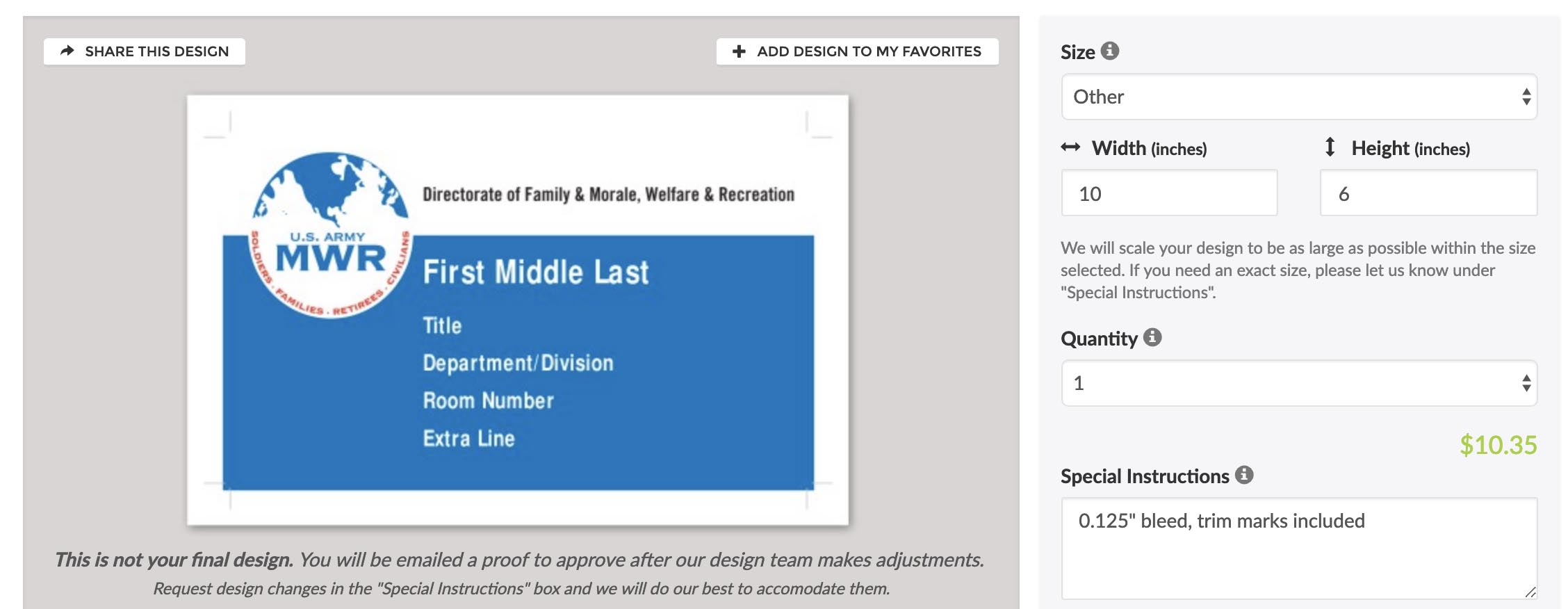
1) Download the door sign template of your choice. Each sign is (WxH) 10"x6" with 0.125" bleed (for the printer to trim off, so color goes to the edge).
2) Populate the fields with information. Text auto-resizes as you type in each field.
3) Save it.
4) You place an order with your printer of choice (online or in town) that can produce RECTANGLE STICKERS.
5) You pay with your GPC.If ordering online:
Here's a sample of what to expect in the online ordering process.
- Facility Manager Photos/Official Command Photos
-
We regeret to inform you that the Fort Carson MWR Marketing Department does not offer Facility Manager Photo/Official Command Photo services.
All Official Command Photos are shot and produced by the Fort Carson Multimedia Visual Information Branch, who falls under Directorate of Plans, Training, Mobilization, and Security (DPTMS). They are located in Bldg. 1230, next to the Outdoor Pool and can be reached at (719) 526-1500.
To get your command photos, submit a work order (Form DA-3903) on the Visual Information Ordering System (VIOS) website using your CAC or AKO credentials to login.
-
Work orders submitted after 3 p.m. MST are added to the queue on the following business day. Request submissions undergo a comprehensive review, then are assigned a project POC, who will contact the requestor for information, clarification, and approvals.
-
The allotted turnaround time for a FIRST DRAFT PROOF of design work is 10 business days after the review of the completed marketing request. Turnaround time begins after all submission requirements are met. Customers will receive communication for any clarification or additional needs before moving forward. Submit complete and accurate information to prevent a delay in the marketing process.
-
Marketing campaign requests or EVENTS or PROGRAMS must be submitted at least 60 days prior to event start date. Non-event requests that require PRINTED MEDIA must be submitted at least 45 days in advance. Requests submitted outside of the required timeframe are forwarded to the division chief for consideration before moving forward with the request, and may be refused.
-
After a first draft is sent to the customer for approval, the customer may request up to 3 iterations of the concept art. Additional iterations are subject to management approval.
-
Once artwork is approved, mandatory approval procedures apply. All marketing materials must go through mandatory NAF Support Division approval processes prior to completion. A finished draft will then be sent to the customer for final approval.
-
Outside printed media can require up to two weeks for printing and delivery time after the final approval of design work, so requestors are encouraged to plan accordingly. Requestors will be responsible for rush fees.
-
Printed media must be picked up by the requestor within 5 business days from notification of delivery to ensure maximum marketing coverage.
- Media Players & Locations
-
Player Name Location CRSN 001 Bldg. 1217 Lobby CRSN 003 Thunder Alley Bowling Center CRSN 006 CYS Central Registration CRSN 007 Grant Library CRSN 008 McKibben PFC CRSN 009 Garcia PFC CRSN 010 Waller PFC CRSN 012 Iron Horse Resiliency Campus CRSN 013 Iron Horse Resiliency Campus CRSN 014 USO CRSN 016 Elkhorn ConferenceCenter CRSN 017 Elkhorn Conference Center CRSN 018 Cheyenne Shadows Golf Course CRSN 020 CYS YS CRSN 021 SFAC CRSN 022 ACS CRSN 023 Family Connection Center CRSN 024 WTU CRSN 025 DEERS CRSN 027 JAG CRSN 028 ODR Rental Counter CRSN 029 ITR CRSN 030 Aspen CDC CRSN 031 Ivy CDC CRSN 032 Monarch CDC CRSN 036 Mesa CDC CRSN ACS 001 LED Billboard Wetzel Ave. CRSN ACS 003 LED Billboard Titus Blvd.
Submissions accepted are for MWR activities and programs only. Requests to promote businesses not in contract with Fort Carson MWR Advertising and Commercial Sponsorship are immediately rejected.
Frequent Media Requests
MWR Marketing Requests
Submit a Marketing Request
(Must be logged in to .mil email account.)
Business Day Definition: Monday-Friday from 7:30 a.m. to 4 p.m. MST (Mountain Standard Time). Excludes weekends, training, federal, post closures, phased releases, delayed reporting and seasonal holidays.
Request Timeframes
For any additional guidance, you can request a Marketing Consult in addition to your work order submission.
Other Support Requests
IT Support Request
To submit an IT support request, please visit: carsonmwr.freshdesk.com
Enterprise Web Access
Click here to begin your request to gain access to the Enterprise system.
Facility Digital Display Support
Submit your ticket directly by emailing the Army MWR Enterprise Digital Signage team at:
support@mwr.zendesk.com
Include the name of the player in your ticket (see below).
Additional Resources
Army MWR Branding Guidelines
• IMCOM Crest and Patch
• U.S. Army Logo
• MWR Brand Central All Logos
• MWR Brand Colors
• MWR Brand Fonts
• MWR Brand Voice Guidelines
Army MWR logos should not be altered in any way, shape, or form.
NAF Employee Resources
• NAF Employee Handbook
• DFMWR Fort Carson Employee Benefits (PDF)